Trakpilot New Feature: Real-time Google Event Testing


Have you ever found yourself asking: “Are my tags actually sending data right now?” or “Is my Purchase event really working for Google Ads, or am I losing attribution?”
If you’ve ever had to wait hours - or even days - for data to finally crawl into Google Analytics just to see if your setup is correct, we have a game-changer for you.
🚀 Introducing: Real-time Google Event Testing
We built this feature directly inside Trakpilot to give you immediate, 100% visibility into your tracking. No more guessing, no more "wait and see," and no more broken ROAS due to missing signals.
What is Real-time Event Testing?
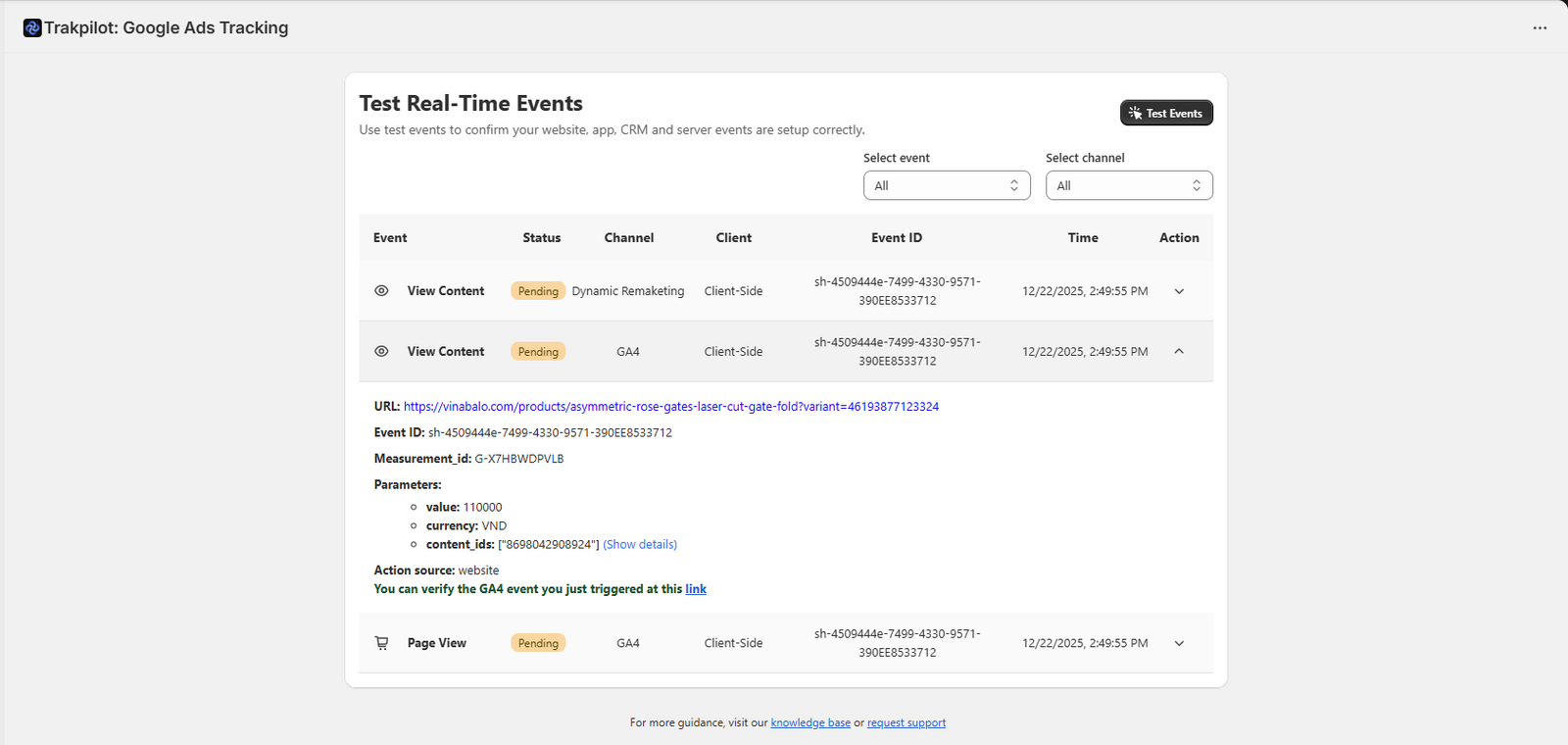
Real-time Event Testing allows you to verify that your Google Ads, GA4, Google Tag, and Dynamic Remarketing tags are firing correctly the second an action happens on your store.
Instead of crossing your fingers and waiting for reports to update, you can now:
See Every Event Firing Live: Watch Page Views, Add to Carts, and Purchases appear in your dashboard instantly.
Verify Status: Instantly check if events are successfully sent across all channels.
- Debug Data: Expand event details to ensure parameters like
value,currency, andcontent_idsmatch your product data exactly.
Why this matters?
In the world of e-commerce, data is the fuel for Google’s machine learning. If your tracking is broken, your campaigns are flying blind. Real-time visibility means you can:
🎯 Catch setup issues before they hurt performance
🎯 Fix broken events instantly
🎯 Launch and optimize campaigns with confidence
🎯 Make sure every conversion counts
When should you use it?
We recommend using the Real-time Event Testing tool whenever:
You first install Trakpilot or connect a new GA4/Google Ads account.
You update your website theme or storefront code.
You install a new app that might conflict with your tracking.
You notice your Google Ads aren't spending (this is often due to a lack of signals!).
You see missing or incorrect purchase values in your reports.
Check out our full guide here to know how to use Real-time Event Testing
Ready to verify your tracking?
Stop leaving your data to chance. Head over to your Trakpilot dashboard and run your first real-time test today.

Shopify Conversion Tracking: A Complete Guide for Accurate Ad Data
Omega TikTok Pixel: New Conversion Analytics is here
Top TikTok Apps for Shopify Could Double Your Conversions
Deduplication in Facebook Pixel: How to Fix Duplicate Events and Track Data Correctly
Omega TikTok Pixel: New Conversion Analytics is here
Omega TikTok Pixels Now Speaks Your Language: Introducing Multi-Language Support

Trakpilot New Feature: Export Your Conversion Events Data
Introducing Real-time TikTok event testing - Omega TikTok Pixels
Two Owls Facebook Multi Pixels Lands on SHOPLINE! 🚀
Omega TikTok Pixel: New Conversion Analytics is here
Omega TikTok Pixels Now Speaks Your Language: Introducing Multi-Language Support
Trakpilot New Feature: Export Your Conversion Events Data
Introducing Real-time TikTok event testing - Omega TikTok Pixels