11+ ChatGPT ads examples for online stores (with copy templates)


Most ChatGPT ads examples you find online show what an ad looks like, but not why one version is more likely to earn a click than another. That second part is what makes an example useful. A ChatGPT ad has a short title, one line of copy, and a small image, so every word has a specific job: say what the product does, who it suits, or when it helps.
This article starts with real ads spotted in ChatGPT and what each one gets right. It then adds illustrative examples for store categories where real ads were harder to find, each written to follow OpenAI’s creative guidance, along with copy templates you can adapt and a simple way to test which version sells. Treat every example as a starting draft. The version worth keeping is the one your own purchase data supports.
What does a ChatGPT ad look like?
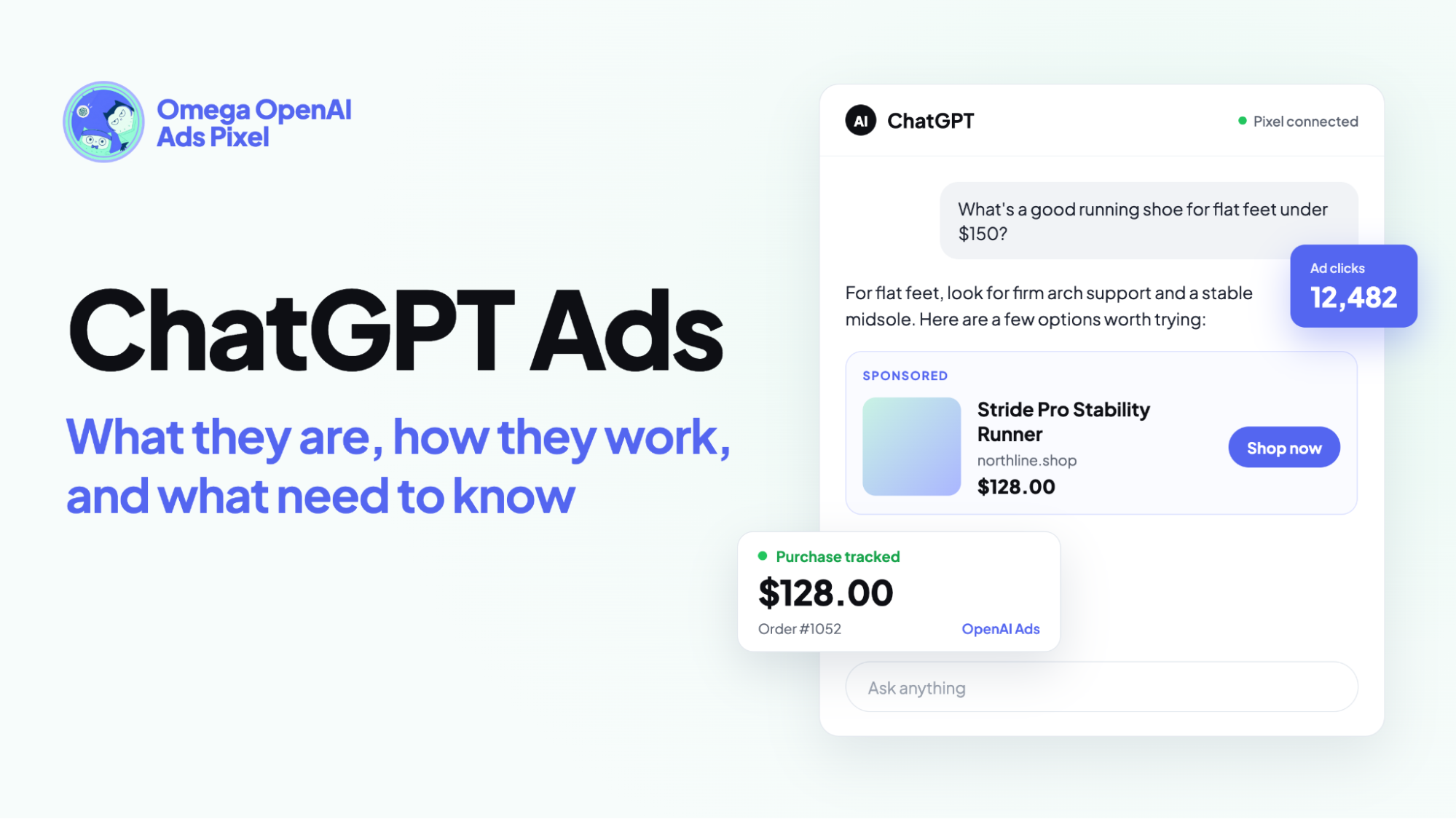
A ChatGPT ad appears as a small card below ChatGPT's answer, clearly labeled as an ad and kept separate from the response itself. A standard ad carries your brand name and logo, a short title, one line of copy, one image, and a link to your landing page. Product feed ads look different, with a row of product cards instead, as one of the examples below shows.
Because the card sits under an answer people came to read, it has only a moment to earn attention. Most users read the response first, then decide almost instantly whether the ad is worth a click. That is why the best ads say one clear thing in a few words. The full limits for text, images, and landing pages are in our guide to ChatGPT Ads specs.
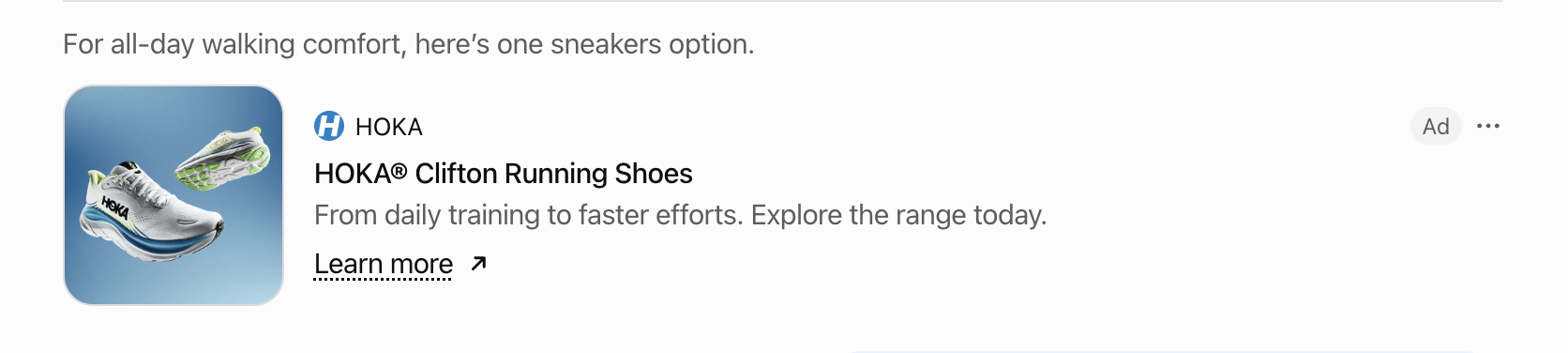
Not every ad is written by hand. Standard ads use a title, copy, and image you create, while product feed ads pull the image, name, price, and product page from your catalog.
A newer format is also in testing. With Sponsored Agents, an ad can open a labeled conversation with an AI representative of the business, where people can ask about its products before visiting the site. According to OpenAI’s Sponsored Agents FAQ, the format is limited to selected advertisers in an alpha test, and OpenAI is not accepting early access requests.
Most examples in this article are standard ads, with one product feed ad included for comparison. Standard ads are where your writing choices make the biggest difference, and they are the format most advertisers can run today.
What makes a good ChatGPT ad?
OpenAI’s creative guidance points to benefit-focused ads that explain the practical value of a product, who it is for, and when it may help. In practice, strong ChatGPT ads get four things right:
- The title states the value. It tells the reader what they get in a few words, ideally within the recommended 16 to 24 characters, rather than relying on a brand name or a slogan.
- The copy adds something new. It gives a detail the title has not covered, such as a key feature, a use case, or an offer, and stays close to the recommended 32 to 48 characters.
- The image is simple. One clear subject on a plain background works best, because the image appears small. Busy scenes and text inside the image are hard to read at that size.
- The landing page keeps the promise. The click should lead to the product or collection the ad describes, with the same price or offer. OpenAI also uses the landing page as a relevance signal and reviews ads against it, so a page that matches the ad helps both approval and the shopper who clicks.
A useful way to check a draft is to ask three questions: what does it do, who is it for, and when does it help? A good title and copy pair usually answers at least two of them. This is the same What, Who, When thinking used to write context hints, so ads and hints written together tend to describe the product the same way.
The examples that follow use these points as a checklist.
11 ChatGPT ads examples and why they work
The first three are real ads spotted in ChatGPT, and the other eight are illustrations for categories where we did not find real ads. Each one ends with a short note on why it works.
Real ads spotted in ChatGPT
These ads appeared in ChatGPT in October 2026 on a Free plan account. Ads run in around 89 countries and change often, so the brands, prices, and currencies you see may differ by market and over time. The notes cover creative choices only, not how well each ad performed, since we have no access to these brands’ results.
1. EnviroBuild Materials LTD: decking samples
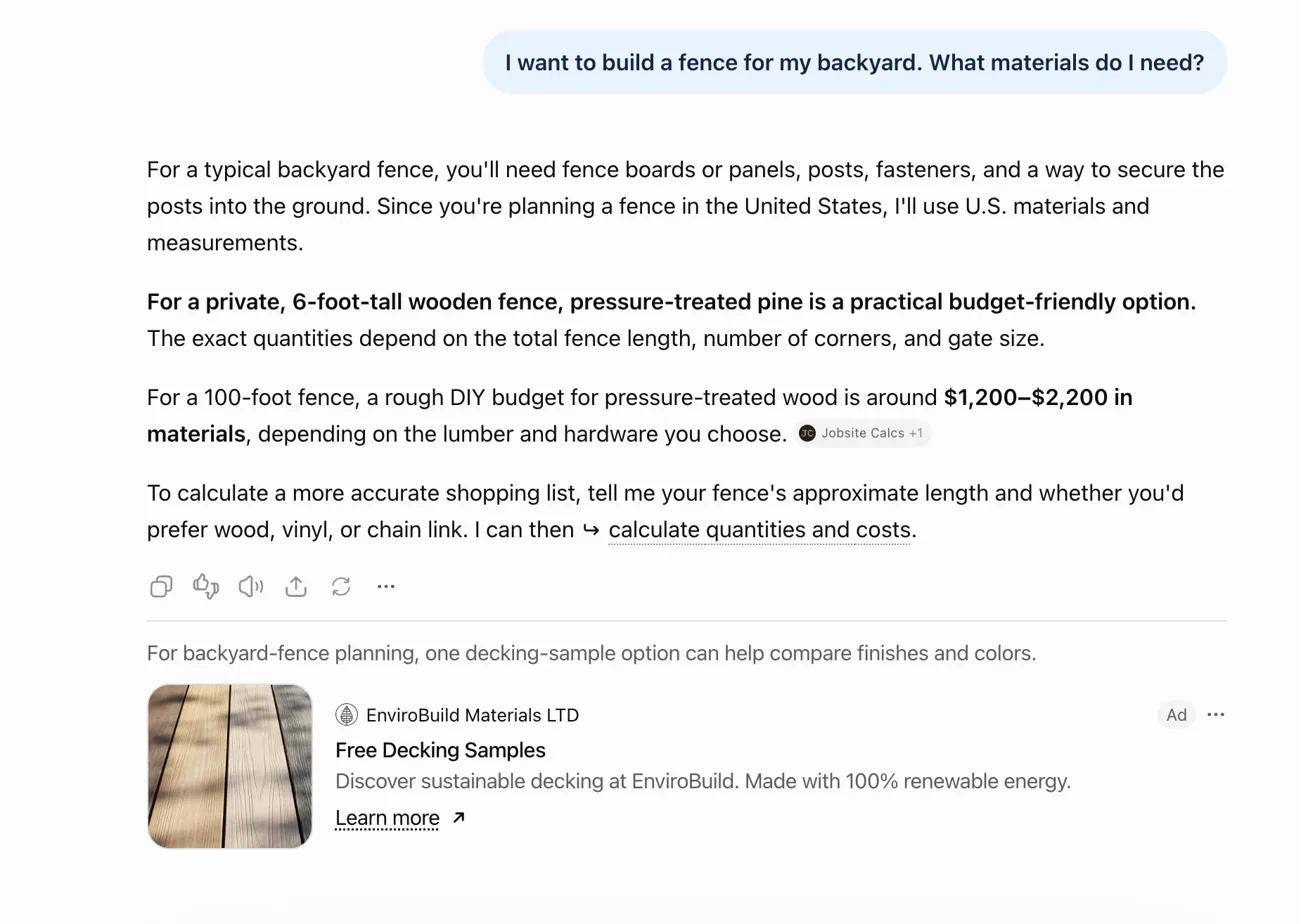
- Title: “Free Decking Samples” (20 characters). It names the offer clearly and sits comfortably inside the recommended 16–24 range.
- Copy: “Discover sustainable decking at EnviroBuild. Made with 100% renewable energy.” (77 characters). It adds the brand benefit (sustainable) and a concrete proof point (100% renewable energy), though it runs past the recommended 32–48 characters.
- Image: a close-up of light wood-effect decking boards that fill the whole frame, with dappled shadows across them. The product is immediately recognizable even at thumbnail size and matches the “decking samples” offer.
- Landing page: https://www.envirobuild.com/collections/decking-samples
Why it works: The conversation was about fence materials, not decking. The ad still fits by offering a related outdoor product (free decking samples) with a low-commitment next step and a sustainability angle, which is the kind of contextual relevance ChatGPT Ads is designed to surface.
2. NutriPaw: dental care
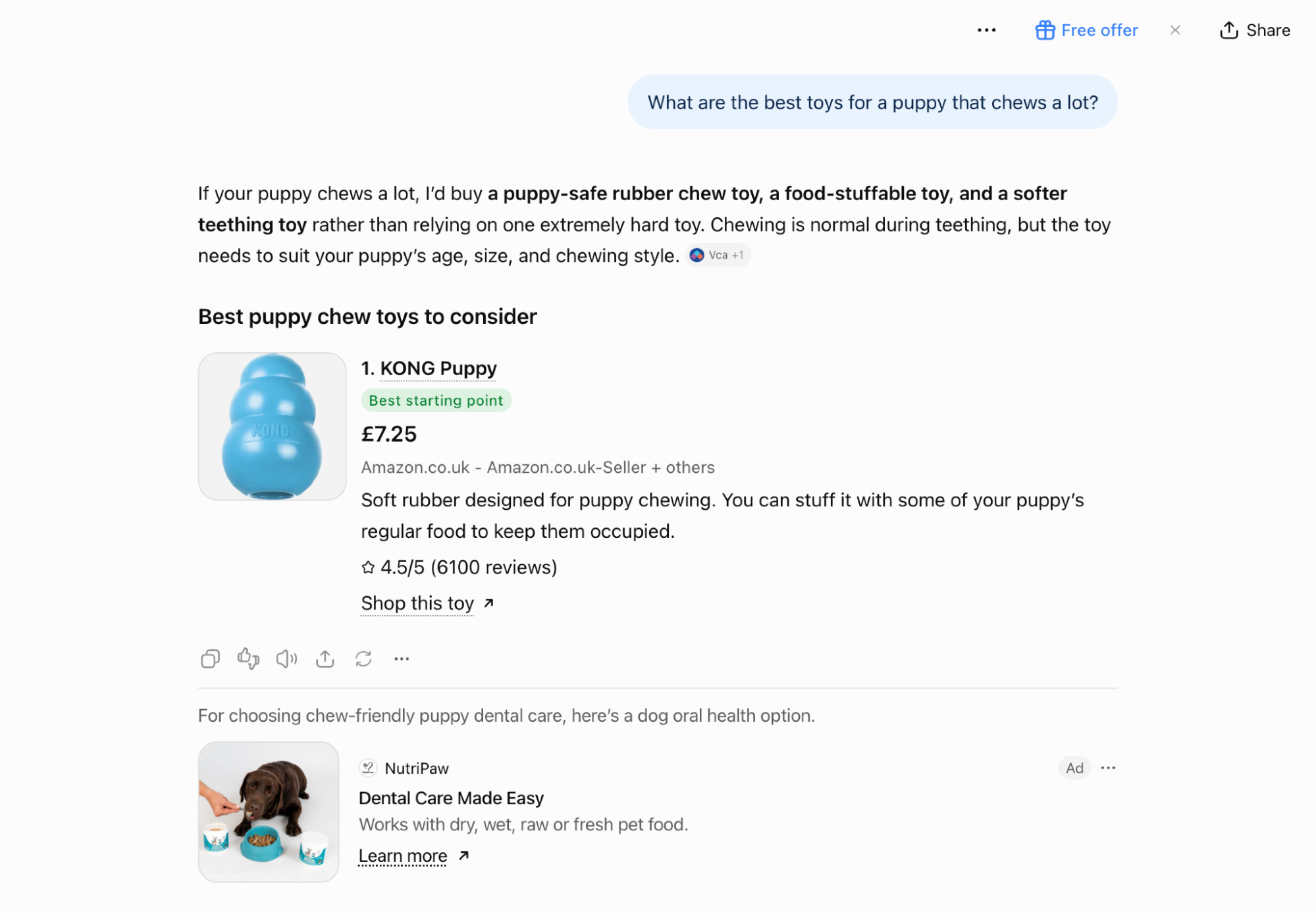
- Title: “Dental Care Made Easy” (21 characters). Clear benefit-focused title that sits inside the recommended 16–24 range.
- Copy: “Works with dry, wet, raw or fresh pet food.” (43 characters). Highlights flexibility across feeding styles and stays within the recommended 32–48 range.
- Image: a dog looking at a food bowl while a hand pours product. Instantly communicates pet oral care and works well at thumbnail size.
- Landing page: https://nutri-paw.com/collections/teeth-gums-oral-health/products/dental-powder
Why it works: The conversation is about chew toys for heavy-chewing puppies. The ad still fits by offering a related solution (dental care) that addresses a common outcome of heavy chewing. It gives a practical, low-friction next step rather than another toy.
3. RS Group: laptop stands (product feed ad)
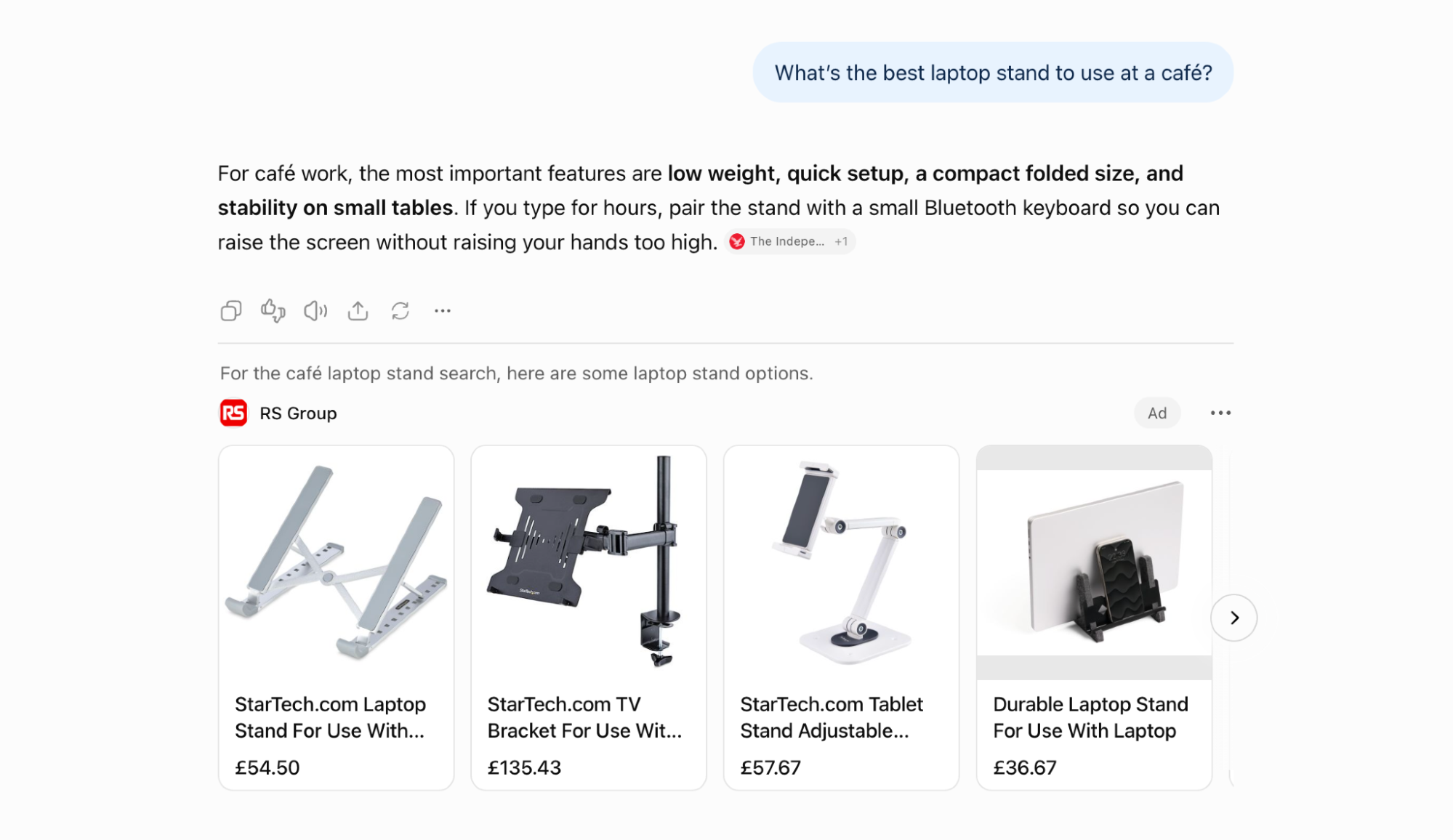
- Format: a scrolling row of product cards pulled from the advertiser’s catalog, rather than a single title and line of copy.
- Product cards: each card shows a product image, the product name, and the price in the shopper’s currency. Long product names are cut off after two lines, so the words at the start of each name do most of the work.
- Images: product shots on plain white backgrounds, which keeps several items easy to compare side by side.
Why it works: the person was looking for a laptop stand, and the ad answers with several options at different price points, so they can compare without leaving the conversation. It also shows why product feed quality matters: the product name, image, and price in your catalog become the ad itself.
Illustrative ChatGPT ads examples for online stores
These examples cover common store categories. Each one follows the same format as the real ads above, with one addition: a sample question the ad could plausibly appear next to. Every title and line of copy sits inside OpenAI’s recommended ranges, so you can see what an ad looks like when it uses the space well.
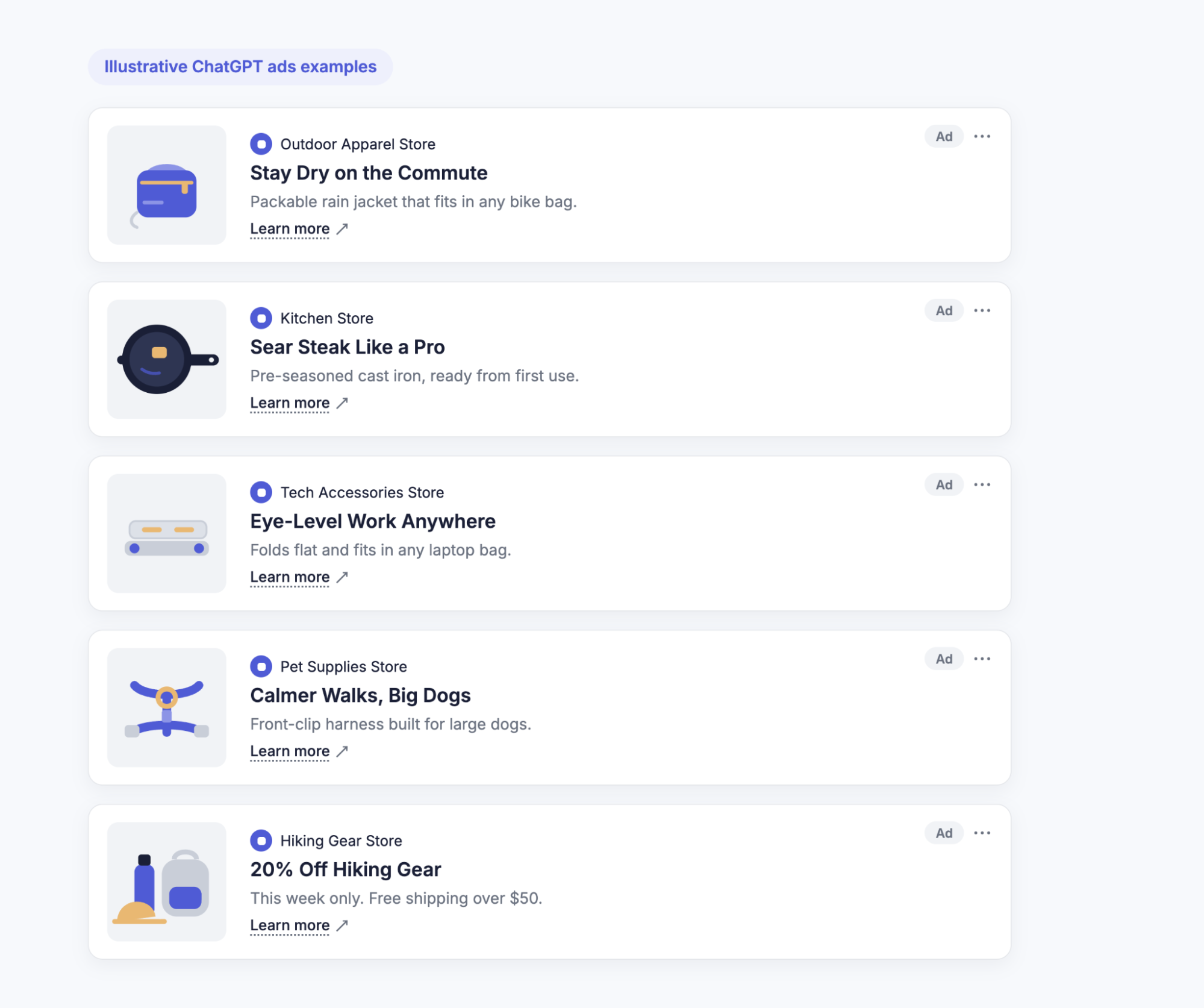
4. Apparel: rain jacket
Could appear after a question like “What should I wear to cycle to work in the rain?”
- Title: “Stay Dry on the Commute” (23 characters)
- Copy: “Packable rain jacket that fits in any bike bag.” (47 characters)
- Image: the jacket folded into its own pocket, next to a small bag for scale.
- Landing page: the product page for that jacket, with sizes and colors on the first screen.
Why it works: the title speaks to the situation in the question, a wet commute, before naming the product. The copy then adds the detail a cyclist cares about, that it packs small.
5. Home and kitchen: cast iron skillet
Could appear after a question like “How do I get a good sear on a steak at home?”
- Title: “Sear Steak Like a Pro” (21 characters)
- Copy: “Pre-seasoned cast iron, ready from first use.” (45 characters)
- Image: the skillet on a plain counter, shown from above so its shape is clear.
- Landing page: the skillet’s product page, with care instructions further down for first-time buyers.
Why it works: the person asked how to do something, not what to buy. The ad answers with the tool for the job, and “pre-seasoned” removes a common worry for anyone new to cast iron.
6. Tech accessories: laptop stand
Could appear after a question like “How can I work comfortably from a café?”
- Title: “Eye-Level Work Anywhere” (23 characters)
- Copy: “Folds flat and fits in any laptop bag.” (38 characters)
- Image: the stand folded flat beside a laptop, so its size is obvious.
- Landing page: the product page, with a short video or photo of the stand being set up.
Why it works: the title names the benefit, a screen at eye level, and the copy handles the main objection to carrying one more item: it folds flat.
7. Pet supplies: dog harness
Could appear after a question like “How do I stop my large dog from pulling on walks?”
- Title: “Calmer Walks, Big Dogs” (22 characters)
- Copy: “Front-clip harness built for large dogs.” (40 characters)
- Image: the harness laid flat with the front clip visible.
- Landing page: the product page, with a sizing guide close to the add-to-cart button.
Why it works: the title describes the outcome without overpromising, and the copy names the feature that delivers it. Both make clear the product is meant for large dogs, which filters out clicks from owners of smaller breeds.
8. A seasonal or offer-led ad
Could appear after a question like “Gift ideas for a friend who just started hiking?”
- Title: “20% Off Hiking Gear” (19 characters)
- Copy: “This week only. Free shipping over $50.” (39 characters)
- Image: a small, simple group of hiking products on a plain background.
- Landing page: a collection page where the discount is already applied or clearly shown.
Why it works: an offer gives people a reason to act now, and the copy adds the details that matter at checkout. Offer ads need one extra step, though: pause them the day the offer ends, so the ad never promises a discount the page no longer shows.
Illustrative ChatGPT ads examples beyond ecommerce
The same principles carry over to other kinds of businesses. These are also illustrations, kept shorter than the store examples above.
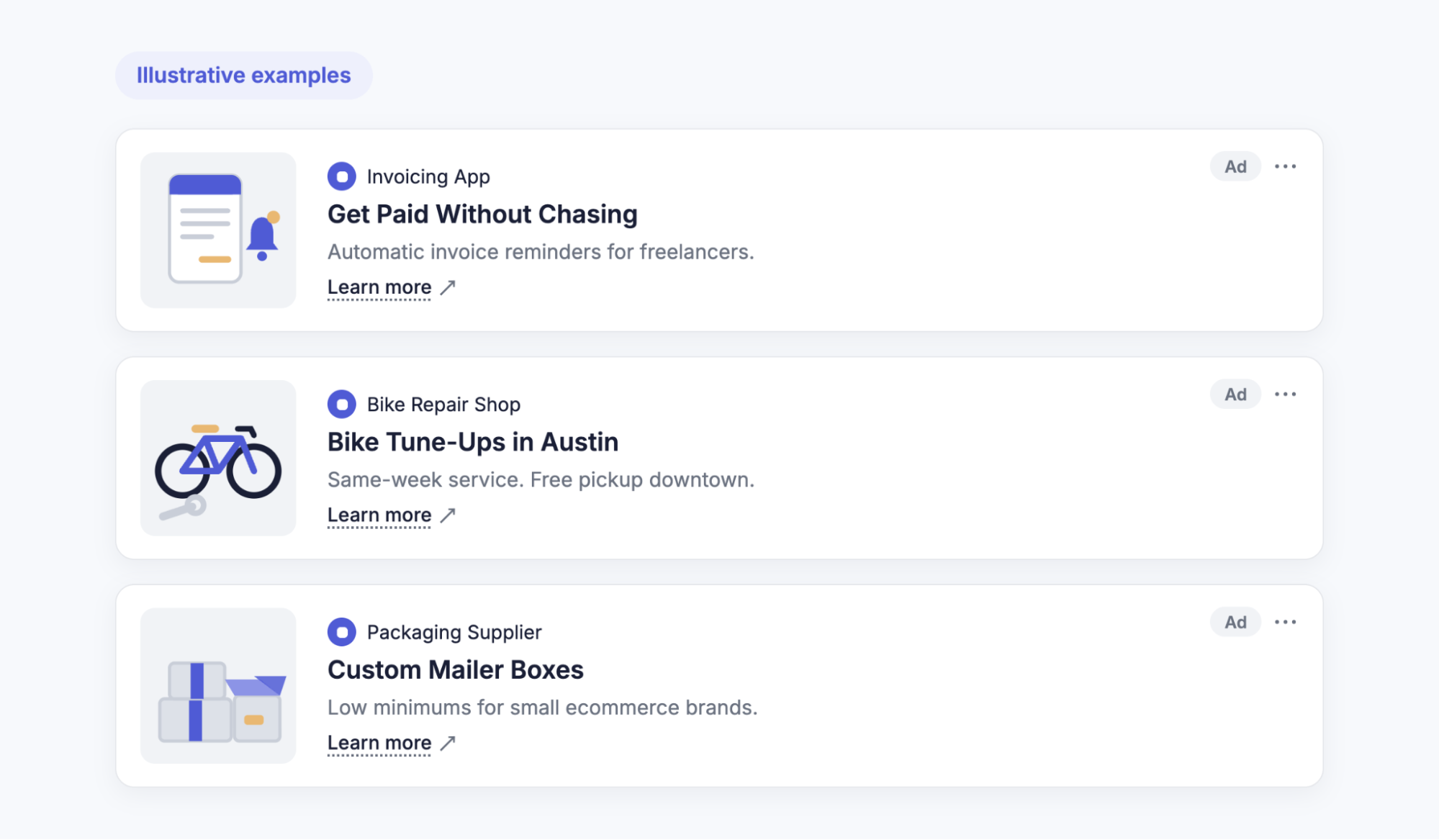
9. Software: an invoicing app
Could appear after a question like “How do I stop chasing late invoices as a freelancer?”
- Title: “Get Paid Without Chasing” (24 characters)
- Copy: “Automatic invoice reminders for freelancers.” (44 characters)
Why it works: the title turns the person’s frustration into the outcome they want. The copy then names the feature and the audience, so a freelancer knows within one line that the product is built for them.
10. Local services: a bike repair shop
Could appear after a question like “How often should I get my road bike serviced?”
- Title: “Bike Tune-Ups in Austin” (23 characters)
- Copy: “Same-week service. Free pickup downtown.” (40 characters)
Why it works: For a local business, the service area is part of the value, so naming the city in the title tells nearby readers the ad is for them. Location targeting in the campaign decides where the ad can appear. The city in the title tells the reader the same thing at a glance.
11. B2B: a packaging supplier
Could appear after a question like “How can a small online brand cut packaging costs?”
- Title: “Custom Mailer Boxes” (19 characters)
- Copy: “Low minimums for small ecommerce brands.” (40 characters)
Why it works: business buyers often filter suppliers by one practical constraint before anything else. “Low minimums” answers that question for a small brand immediately, and the copy names who the offer is for.
ChatGPT ad copy templates
Most of the examples in this article follow one of four patterns. You can use them as starting points: fill in the brackets, then cut until the title and copy fit the recommended lengths.
| Template | Title pattern | Copy pattern | Example |
|---|---|---|---|
| Benefit + situation | [Outcome] + [when it matters] | [Key feature], [practical detail] | “Warm Hands on Cold Rides” / “Windproof gloves with touchscreen fingertips.” |
| Feature → benefit | [The feature itself] | [What it means for the user] | “Waterproof Hiking Boots” / “Dry feet on muddy trails, from day one.” |
| Problem → solution | [The problem, solved] | [What the product is] + [who or where] | “No More Tangled Cables” / “Magnetic cable organizer for any desk.” |
| Offer → deadline | [The offer] | [The terms] + [when it ends] | “Free Shipping This Week” / “On all orders over $40. Ends Sunday.” |
Every example title in the table is 22 to 24 characters, and every line of copy is 36 to 45.
Templates only help if the words inside them are specific. Three common slips, and how to fix them:
- Generic instead of specific. “Shop Our New Collection” with “Quality you can trust.” fits the space but could describe any store. Naming the product and its benefit, as in “Warm Hands on Cold Rides,” gives the reader a reason to click.
- Copy that repeats the title. “Gloves for Winter Riding” followed by “Gloves for winter riding, now available.” spends both lines on the same idea. The copy should add something new, such as a feature or an offer.
- A slogan instead of a benefit. “Comfort Meets Style” sounds polished but says little about what the product does. “Ride Warmer This Winter” makes the same promise in plain terms.
When an offer-led ad ends, pause it rather than leaving it to run. And whichever template you use, keep claims in the copy consistent with the landing page.
How to test which example works for you
An example only shows what a good ad can look like. Whether it works for your store depends on your products, your customers, and the conversations your ads appear next to. The way to find out is to run a few versions side by side and let purchases decide.
- Pick three to five angles. Choose different templates for the same product, such as one benefit-led ad, one problem-led ad, and one offer-led ad. Different angles tell you more than several rewordings of the same idea.
- Keep each ad group focused. Put ads for one product or customer need in the same ad group, with context hints that describe that need. That way, differences in results come from the ads themselves rather than from mixing unrelated products.
- Give each version enough time. As a starting point, let the ads run for at least a full week before comparing them. There are no published benchmarks for how long a ChatGPT ads test should run, and delivery can swing from day to day, so give lower-volume tests longer. Change one thing at a time, so you know what caused any difference.
- Judge by purchases, not clicks. An ad with a high click-through rate can still bring in shoppers who leave without buying. Compare versions by conversions and cost per purchase, and keep the one that sells at a cost you can afford.
That last step depends on Ads Manager actually receiving your purchases.
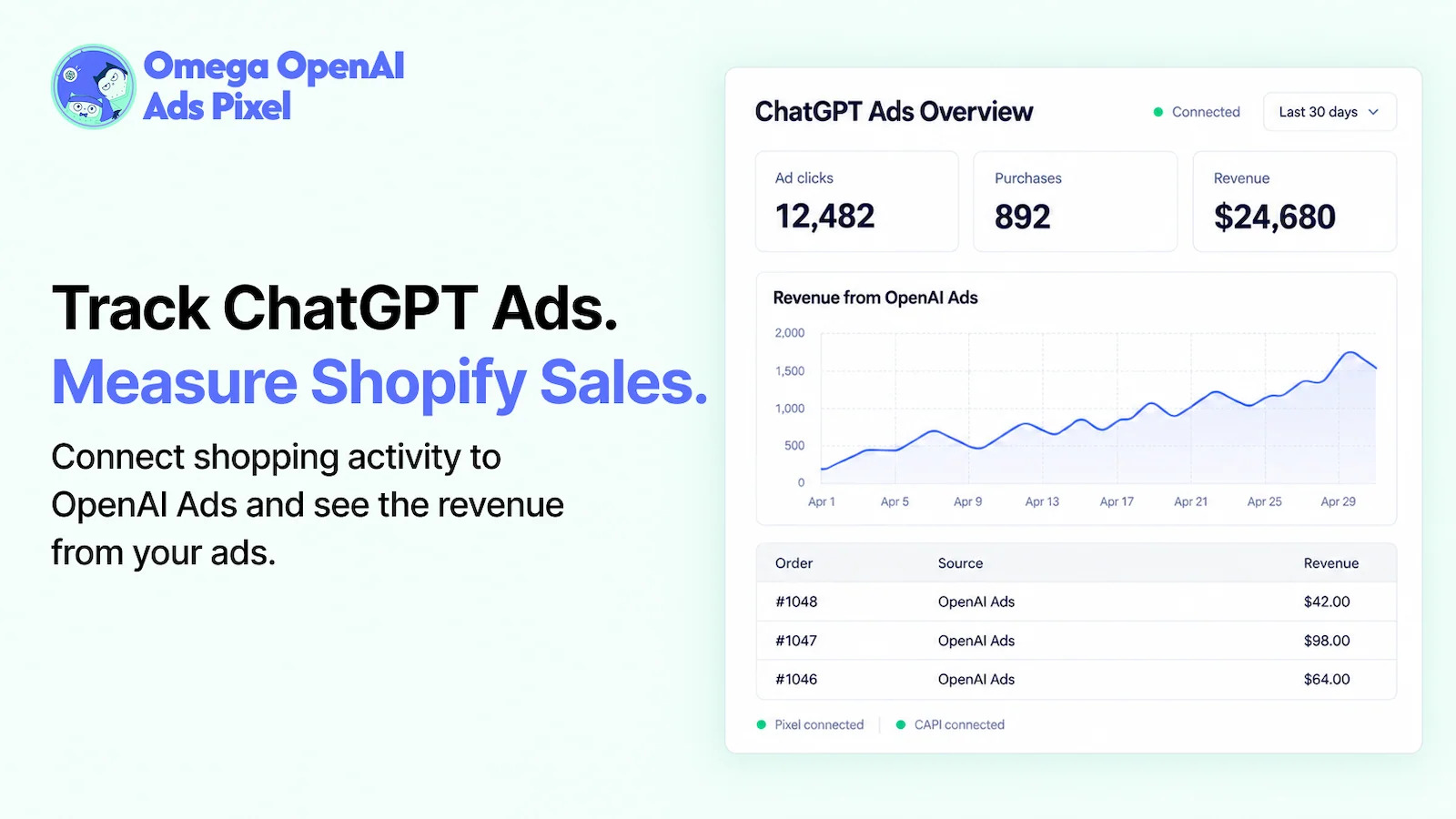
For Shopify stores, Omega OpenAI ChatGPT Ads Pixel sends purchase events from both the browser and the server with a shared ID, so each order is counted once and results by ad rest on more complete data. Our guide to ChatGPT Ads conversion tracking walks through the full setup.
Wrap up
The most useful thing to take from these ChatGPT ads examples is the structure, not the exact words. Most of the real ads and illustrations above share the same habits: a title that names a clear benefit, copy that adds one new detail, a simple product image, and a page that delivers what the ad promised. Borrow those habits, fill in your own product, and you have a first draft.
From there, let your store’s results do the editing. Run a few versions built on different angles, give them time, and keep the one that brings in orders at a cost you can afford.
To see which version sells on a Shopify store, Omega OpenAI ChatGPT Ads Pixel sends your purchases to Ads Manager from both the browser and the server. The app is free to install.
- 1 What does a ChatGPT ad look like?
- 2 What makes a good ChatGPT ad?
- 3 11 ChatGPT ads examples and why they work
- 4 ChatGPT ad copy templates
- 5 How to test which example works for you
- 6 Wrap up
New in Omega TikTok Pixel: Connect your catalog to a pixel
ChatGPT ads: What they are, how they work, and what advertisers need to know in 2026
Omega Facebook Pixels Catches Catalog and Pixel Mismatches Before Your Match Rate Drops
Google Performance Max: A complete guide to setup, optimization, and reporting
Are Omega Pixels Safe After the Shopify Checkout Hijacking? Yes, Here's Why
New in Omega TikTok Pixel: Connect your catalog to a pixel
ChatGPT ads: What they are, how they work, and what advertisers need to know in 2026
Omega Facebook Pixels Catches Catalog and Pixel Mismatches Before Your Match Rate Drops
Google Performance Max: A complete guide to setup, optimization, and reporting