Meta Ads Click Fraud: How Bots Drain Your Budget and Poison Your Pixel (2026 Guide)


Meta ads click fraud is any click, view, or conversion event on your Facebook or Instagram ads that comes from a bot, a click farm, or a fraudulent publisher instead of a real shopper. It costs you twice: once when you pay for the fake click, and again when Meta's algorithm learns from the fake data and goes looking for more people like that "visitor."
If you've ever seen 600 link clicks in Ads Manager, 200 sessions in Shopify, and zero sales, you already know the feeling. This guide explains where Meta ad fraud comes from, how to spot it, and how to stop bad data from reaching your Meta Pixel and Conversions API.
Key takeaways
- Bots now generate over half of all web traffic. Imperva's 2026 Bad Bot Report puts it at 53%, with 40% of all traffic classified as malicious.
- Lunio's 2026 Global IVT Report measured an 8.2% invalid traffic rate on Meta. On $10,000 a month of spend, that's about $820 paying for nobody.
- The bigger cost is data poisoning: fake PageView, AddToCart, and Purchase events train Meta's algorithm to find more bots.
- Meta can't block traffic by IP, so every click fraud defense on Meta works after the click. Your best leverage is controlling which events reach Meta.
- Cleaning your event stream at the source, before it hits the Pixel and CAPI, protects reporting, retargeting audiences, and ROAS.
What is Meta Ads click fraud?
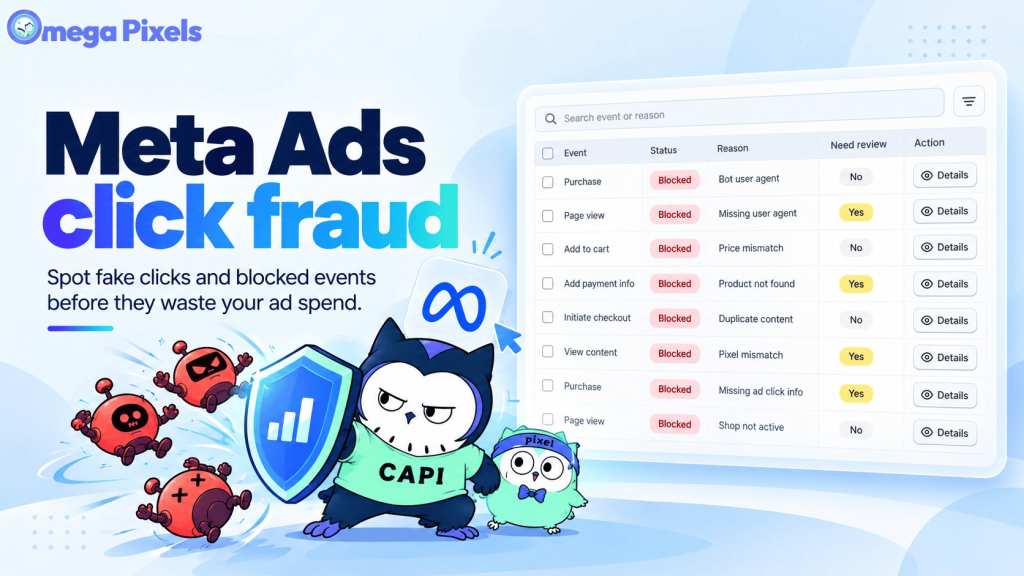
Meta Ads click fraud is the deliberate generation of ad clicks or conversion events with no genuine buying intent. It falls under the wider industry term invalid traffic (IVT), which covers everything from known crawlers to sophisticated bots built to look human.
On Meta, fraud usually comes from four sources:
| Source | How it works | Why it's hard to catch |
|---|---|---|
| Bot networks | Automated or headless browsers click ads and load pages, often through residential proxies | Traffic comes from real consumer IP addresses |
| Click farms | Low-paid workers tap ads on racks of real phones | Real humans on real devices pass most automated checks |
| Audience Network publisher fraud | Third-party apps that earn per click inflate taps on your ads | Placements run outside Facebook and Instagram, with little visibility |
| Event spoofing | Scripts fire fake Pixel or server events (often fake Purchases with inflated values) directly at your tracking | Spoofed events look technically identical to real ones in Events Manager |
Add accidental mobile taps on full-screen placements, and junk submissions on Lead Ads Instant Forms, and you have the full picture of invalid traffic on Facebook and Instagram. The first three sources in the table waste ad spend. Event spoofing doesn't even need a click. It goes straight for your conversion data.
How big is the problem in 2026?
Bots are no longer a fringe slice of traffic. They're the majority.
| Metric | Figure | Source |
|---|---|---|
| Share of all web traffic from bots (2025) | 53% | Imperva 2026 Bad Bot Report |
| Share of all web traffic that is malicious (2025) | 40% | Imperva 2026 Bad Bot Report |
| Invalid traffic rate on Meta ads | 8.2% | Lunio 2026 Global IVT Report |
| Average IVT rate across all paid channels | 8.51% | Lunio 2026 Global IVT Report |
| Online ad spend lost to fraud (2023) | $84B (22%) | Juniper Research |
| Projected ad spend lost to fraud by 2028 | $172B | Juniper Research |
Lunio notes that Meta's IVT rate is actually one of the lower ones it measured. The issue is scale. With billions of clicks flowing through Facebook and Instagram, even 8% adds up fast, and individual accounts can run far higher, especially lead-gen campaigns and anything with Audience Network placements switched on.
Juniper Research's analyst put the core problem plainly: ad platforms give "an optimistic view of campaign efficiency," because they don't separate real users from bots and click farms in the numbers they show you.
Why click fraud hurts more than your budget
Most articles about Meta click fraud stop at wasted spend. For a Shopify store, the more expensive damage happens inside your tracking.
1. It poisons the algorithm. Meta decides who sees your ads by studying who converted. When bots fire ViewContent, AddToCart, or Purchase events, Meta treats them as buyers and finds more traffic that behaves like them. Lunio describes this as a negative feedback loop: the more invalid events you send, the more invalid traffic you get.
2. It inflates your funnel. Crawlers and bots load product pages constantly. Without filtering, PageView and ViewContent counts swell, conversion rates look worse than they are, and you may pause campaigns that are actually working.
3. It corrupts audiences. Retargeting pools and lookalike seeds built from bot events carry the bot into your prospecting campaigns.
4. It fakes revenue. A spoofed Purchase event with a $5,000 value can make a dead ad set look like your best performer. Merchants on Meta's developer forum and the Shopify Community describe fake purchase events fired from product pages and developer tools, and say the damaged optimization history can't simply be undone.
Does Meta protect advertisers from click fraud?
Partly. Meta runs automated filters that catch obvious invalid activity, such as known bot IPs, accidental double clicks, and clear automation patterns, and it credits some invalid clicks back to your account. But there are hard limits:
- No IP blocking. Google Ads lets fraud tools exclude IP addresses before an ad is served. Meta doesn't, so any third-party defense on Meta kicks in after you've already paid for the first click.
- Sophisticated bots slip through. Bots that scroll, dwell, and rotate identities often pass Meta's built-in filters.
- Meta's terms limit its responsibility. Meta's Self-Serve Ad Terms state that it can't control how clicks are generated and isn't responsible for click fraud.
- Credits are opaque. When Meta does credit invalid activity, you see an adjustment in Billing, not which clicks were rejected or why.
- Automation widens the net. Advantage+ campaigns and automated placements optimize for cheap, abundant events, and bots are very good at producing cheap events.
- Meta's filters protect billing, not your data. Even when Meta doesn't charge you for a bad click, the fake events that bot generates on your store can still reach your Pixel and CAPI unless you filter them.
That last point is the gap merchants can actually close.
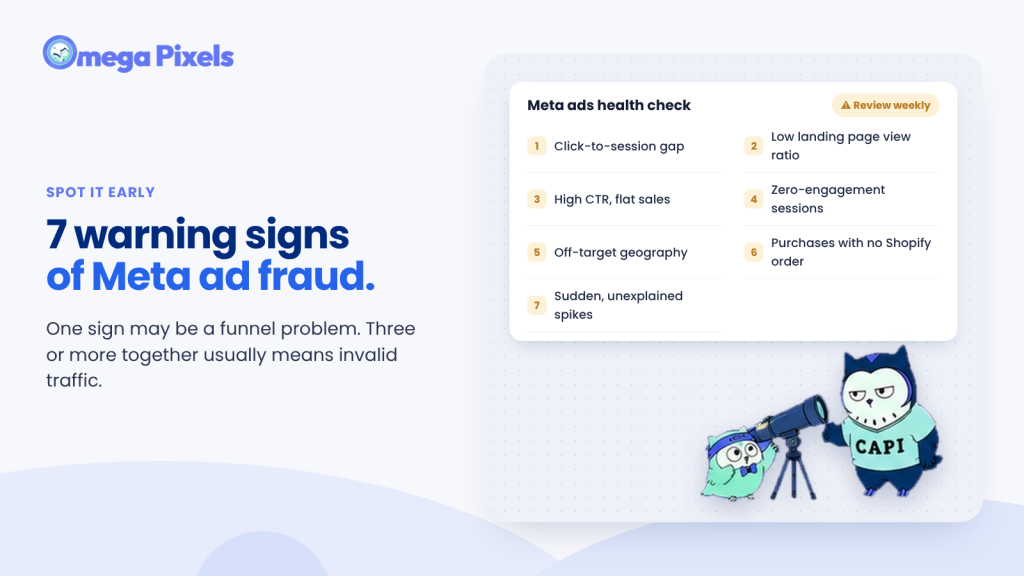
7 warning signs of click fraud in your Meta campaigns
| Warning sign | What it looks like | Where to check |
|---|---|---|
| Click-to-session gap | Ads Manager shows far more link clicks than your store records sessions | Ads Manager vs. Shopify Analytics or GA4 |
| Low landing page view ratio | Landing Page Views ÷ Link Clicks well below normal for your account | Ads Manager columns |
| High CTR, flat sales | Click-through rate jumps while add-to-carts and orders don't move | Ads Manager + Shopify orders |
| Zero-engagement sessions | 0–2 second visits, no scroll, single page | Session recordings or analytics |
| Off-target geography | Traffic from countries you never targeted | Analytics by country, IP data |
| Purchases that don't exist | Meta reports Purchase events that have no matching Shopify order, or values that don't match | Events Manager vs. Shopify orders |
| Sudden spikes | Click or event volume jumps with no change in creative, budget, or audience | Ads Manager breakdown by placement |
One sign on its own may just be a funnel problem. Three or more together usually means invalid traffic.
How to stop Meta Ads click fraud: 7 fixes
1. Exclude Audience Network placements
Audience Network puts your ads inside third-party apps and sites, and it's the placement most often linked to low-quality clicks. In Ad set → Placements, switch to manual placements and uncheck Audience Network.
Then check one more box. Since October 2025, Sales and Leads campaigns can spend up to 5% of budget on each placement you excluded when Meta predicts better performance. Industry coverage reports the option is ticked by default in Ads Manager. Exclude four placements and up to 20% of spend can flow back into them, so deselect it if you want a strict exclusion.
2. Optimize for purchases, not clicks
Ask Meta for link clicks and it finds the cheapest clicks available, which are often bots. Optimize for Purchase (or Add to Cart if you lack purchase volume). Bots rarely complete a real paid checkout, so purchase optimization naturally filters out much of the junk.
3. Reconcile Meta data with your store data weekly
Compare link clicks, landing page views, and Shopify sessions every week. Compare Meta-reported Purchases and values against real Shopify orders. A gap that keeps widening is your earliest fraud signal.
4. Deduplicate Pixel and Conversions API events in Events Manager
If you send the same Purchase from both the browser Pixel and the Conversions API, Meta needs a matching event_name and a shared event_id to recognize them as one order. Without that, one sale is counted twice, and inflated conversions look a lot like fraud. While you're in Events Manager, watch Event Match Quality too: if EMQ drops while event volume climbs, fake customer data is one possible cause.
5. Only send Purchase events for real, matching orders
A Purchase should fire only when an order exists in your Shopify store and its value matches what was charged. Events with an order that can't be found, a mismatched price, or a pixel that doesn't belong to your store should never reach Meta.
6. Filter bots and suspicious events before they reach Meta
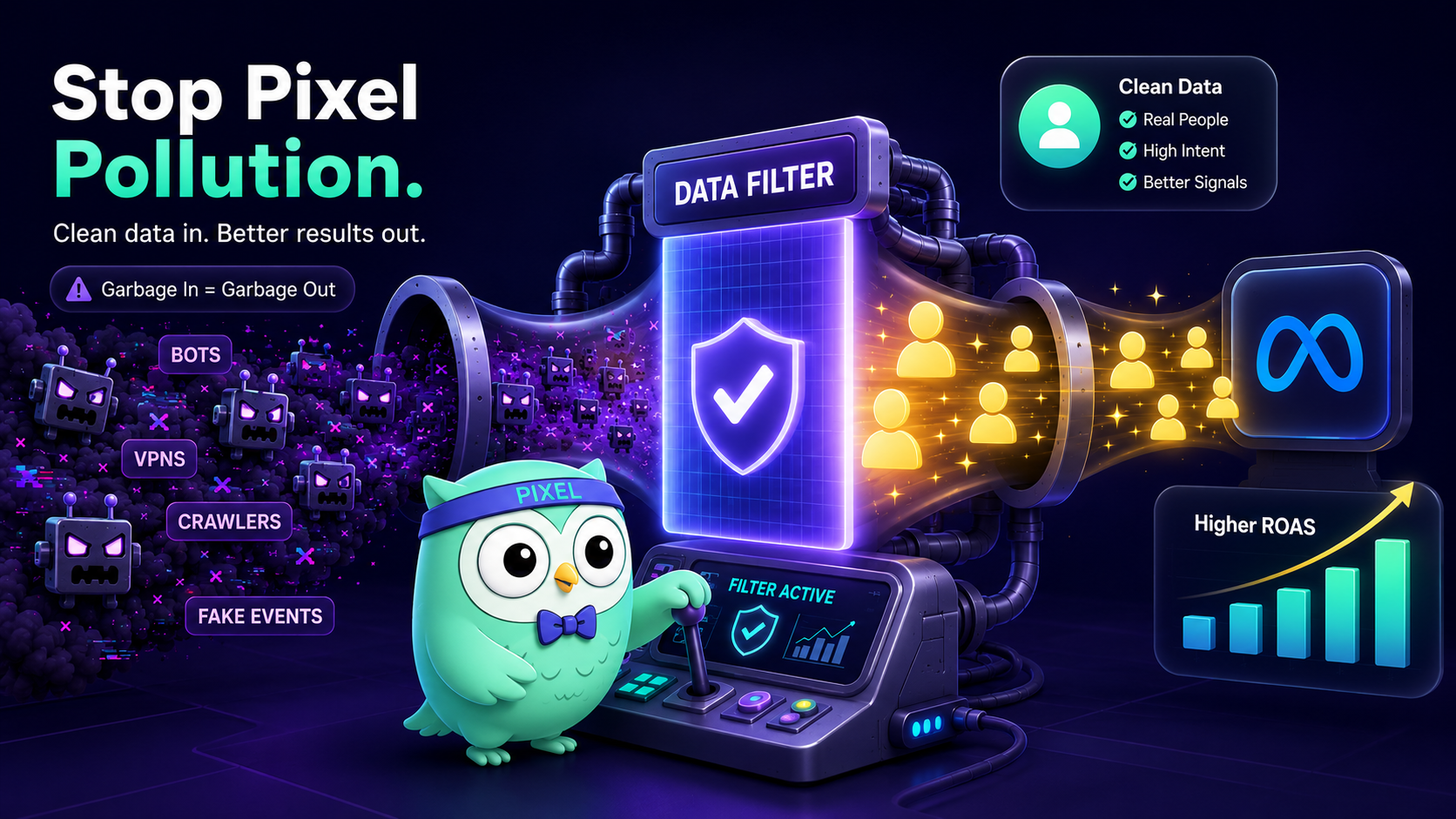
You can't stop a bot from clicking an ad. You can stop its fake events from teaching Meta anything. This is the job of a bot filter at the tracking layer: check each event, send the trustworthy ones, and hold the rest for review. More on how Omega does this below.
7. Request credits for invalid clicks you can document
First, check Billing for existing invalid activity adjustments. If you find clear invalid activity that Meta didn't credit, contact Meta Business Support through billing help and include dates, campaign IDs, and evidence such as blocked-event logs. Approved adjustments usually come back as ad credit, not cash, and Meta's billing terms set time limits on disputing charges, so act within weeks, not months.
How Omega Facebook Pixel's Bot & Fraud Protection keeps your Meta data clean
Omega Facebook Pixel, Meta Ads is a Built for Shopify app that manages your Meta Pixel and Conversions API, rated 4.9 from nearly 1,000 merchant reviews. Its new Bot & Fraud Protection feature fixes the problem Meta leaves to you: deciding which events are real before they're sent.
It works in two layers.
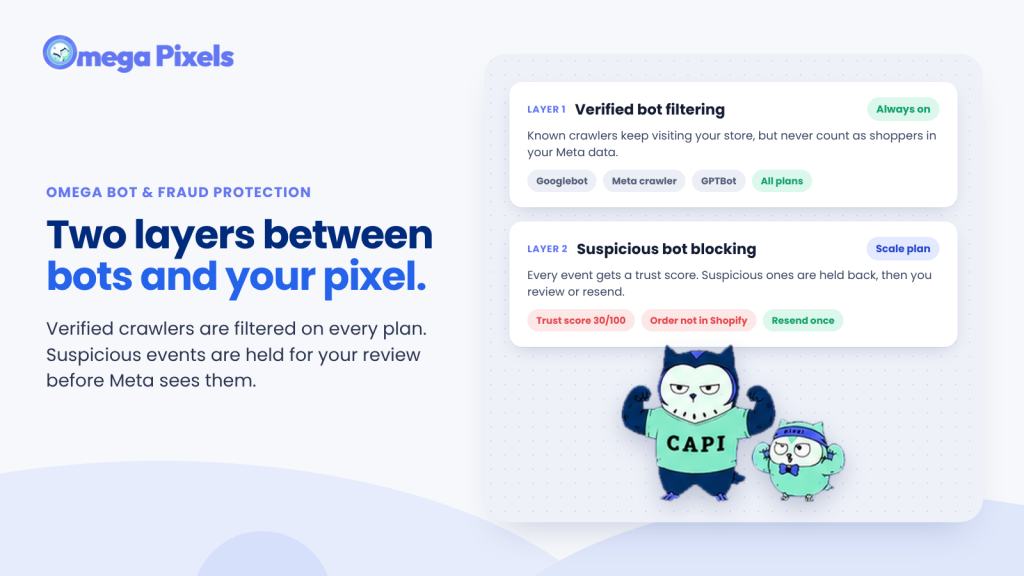
Layer 1: Verified bot filtering (always on, every plan)
The app automatically recognizes visits from verified crawlers such as Googlebot, Meta's own crawler, GPTBot, and other authenticated bots. Those visits are not sent to Meta as customer events.
- Crawlers can still visit your store. SEO and link previews are unaffected. Their visits just stop counting as shoppers in your Meta data.
- No setup. In Settings, Verified bot filtering shows as Always on.
- Free on every plan, including Free.
The result: your PageView and ViewContent numbers stop being inflated by crawlers.
Layer 2: Suspicious bot blocking (toggle on, Scale plan)
When you turn this on, Omega scores every event for trust before sending it. It looks at signals such as:
- Signs of automated tools (for example a non-browser user agent like curl, python, or postman)
- Abnormal request speed or repeated requests
- Order data that doesn't match your store, like an order not found in Shopify or a price mismatch
- A pixel that doesn't belong to your store
- No browsing history before a purchase
- Missing Meta cookies (fbp/fbc)
- Unusual IP addresses
Trusted events go to Meta as normal. Suspicious events are held back, not sent, and listed in the Bot & fraud tab for you to review.
Review, then decide: the Bot & fraud report
Go to Tracking analytics → Bot & fraud to see:
- Total blocked traffic, split into verified bots and suspicious activity
- Top blocked reasons (Googlebot, Meta crawler, bot user agent, duplicate event…)
- Top blocked event types (Page view, Purchase, View content, Add to cart…)
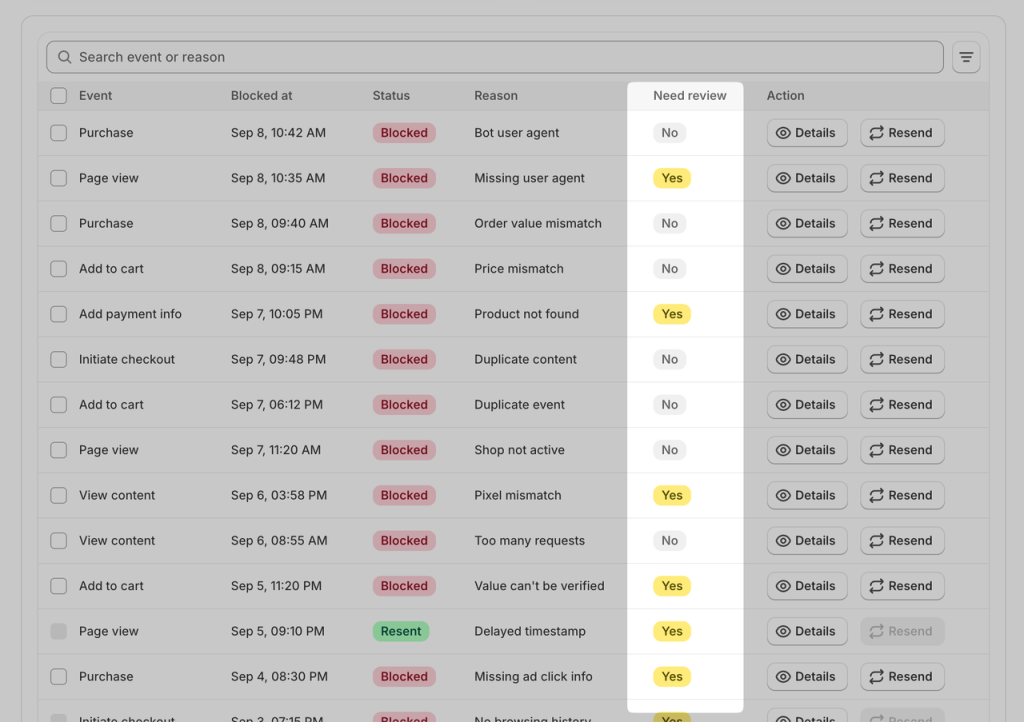
- A searchable, filterable table of every blocked event with Details and Resend
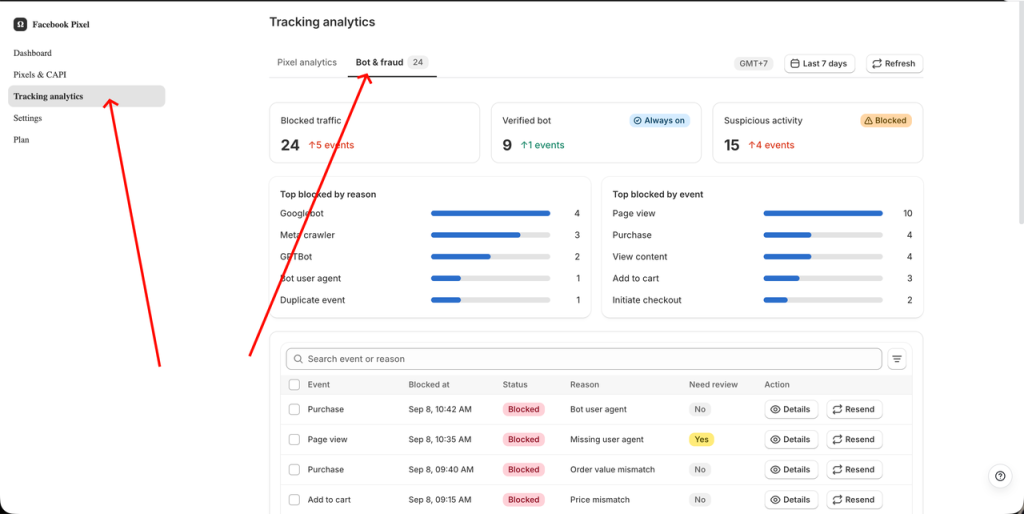
The Need review column flags which events deserve a second look first, such as an event blocked for a missing user agent or a delayed timestamp, where a real customer is possible.
Click Details on any event to see its trust score, the reason it was blocked, the page, IP address, country, device, Meta cookies, recent events from the same visitor, and order information if there is one.
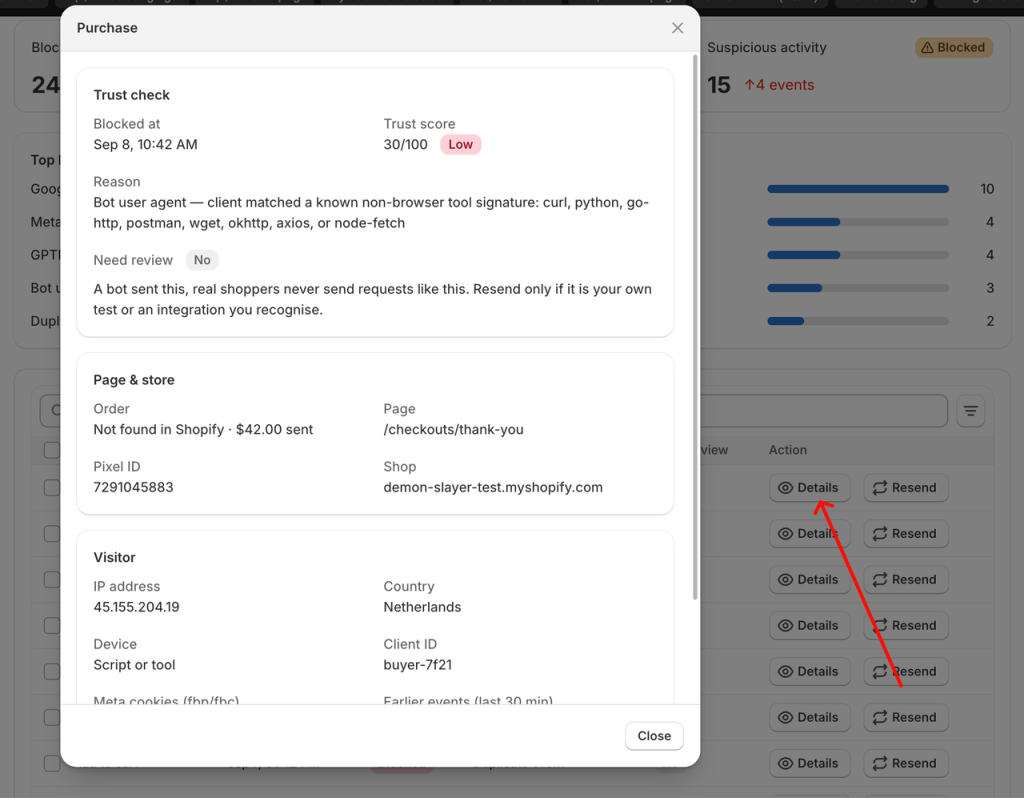
Blocked a real customer by mistake? Click Resend and the event goes to Meta. Each event can be resent only once, then its status changes to Resent, so you never create duplicates. Verified crawlers have no Resend option, since they're never real shoppers.
What you get
- Crawlers stop inflating PageView and ViewContent
- Fake purchases and inflated order values never reach Meta's optimization
- Duplicate and repeated requests don't skew your data
- A clear report of what was blocked and why
- Full control: review uncertain events and resend real ones
An honest note: Bot & Fraud Protection controls the data you send to Meta. It doesn't stop Meta from charging you for a bot's click, because no tool can do that on Meta. Pair it with the placement and optimization fixes above for the strongest protection.
An honest note: Bot & Fraud Protection controls the data you send to Meta. It doesn't stop Meta from charging you for a bot's click, because no tool can do that on Meta. Pair it with the placement and optimization fixes above for the strongest protection.
Frequently asked questions
What percentage of Facebook ad clicks are bots?
It varies by account and placement. Lunio's 2026 Global IVT Report measured an average 8.2% invalid traffic rate on Meta. Lead-gen campaigns and Audience Network placements tend to run much higher than Facebook and Instagram feeds.
Does Meta refund you for click fraud?
Meta automatically credits some clicks it identifies as invalid. For activity it missed, you can request a review through Meta Business Support's billing help, with evidence. Approved adjustments usually come back as ad credit, and Meta's terms limit its responsibility for click fraud.
Can I block IP addresses on Facebook Ads?
No. Meta Ads Manager has no IP exclusion feature. That's why protection on Meta focuses on placements, optimization goals, audience exclusions, and filtering events before they reach your Pixel.
Can bots send fake Purchase events to my Meta Pixel?
Yes. Scripts can fire Pixel or server events directly, including fake Purchases with inflated values. Validating each Purchase against a real Shopify order before sending it to Meta, which Omega's Suspicious bot blocking does, prevents this.
Will filtering bots hurt my SEO or link previews?
Not with Omega. Verified crawlers like Googlebot and Meta's crawler can still access your store normally. They simply aren't counted as customers in the events sent to Meta.
How do I check for click fraud in Meta Events Manager?
Look for three things: event spikes with no matching rise in Shopify orders, duplicate warnings between Pixel and Conversions API events, and Event Match Quality falling while event volume rises. Then compare Link Clicks against Landing Page Views by placement in Ads Manager to see where the gap lives.
Should I turn off Audience Network?
For most Shopify stores, yes. It's the placement most often linked to low-quality and invalid clicks. Test with your own data, and check that limited spend on excluded placements is turned off if you want a full exclusion.
Clean data is your best defense against Meta Ads click fraud
You can't stop every bot from clicking your ads. You can stop them from deciding where your budget goes next. Tighten placements, optimize for purchases, reconcile your numbers, and make sure only real shopper events reach Meta.
Install Omega Facebook Pixel free to turn on verified bot filtering today, then upgrade to Scale when you're ready to block suspicious events and fake purchases before Meta learns from them.
- 1 What is Meta Ads click fraud?
- 2 How big is the problem in 2026?
- 3 Why click fraud hurts more than your budget
- 4 Does Meta protect advertisers from click fraud?
- 5 7 warning signs of click fraud in your Meta campaigns
- 6 How to stop Meta Ads click fraud: 7 fixes
- 6.1 1. Exclude Audience Network placements
- 6.2 2. Optimize for purchases, not clicks
- 6.3 3. Reconcile Meta data with your store data weekly
- 6.4 4. Deduplicate Pixel and Conversions API events in Events Manager
- 6.5 5. Only send Purchase events for real, matching orders
- 6.6 6. Filter bots and suspicious events before they reach Meta
- 6.7 7. Request credits for invalid clicks you can document
- 7 How Omega Facebook Pixel’s Bot & Fraud Protection keeps your Meta data clean
- 8 Frequently asked questions
- 8.1 What percentage of Facebook ad clicks are bots?
- 8.2 Does Meta refund you for click fraud?
- 8.3 Can I block IP addresses on Facebook Ads?
- 8.4 Can bots send fake Purchase events to my Meta Pixel?
- 8.5 Will filtering bots hurt my SEO or link previews?
- 8.6 How do I check for click fraud in Meta Events Manager?
- 8.7 Should I turn off Audience Network?
- 9 Clean data is your best defense against Meta Ads click fraud
Why Is GA4 Revenue Lower Than Shopify? Common Reasons Your Reports Don't Match
Why Clean Data Is the Secret to Scaling Your Shopify Ads
Meta Attribution Window Changes: What Advertisers Need to Fix Now
Top TikTok Apps for Shopify Could Double Your Conversions
Deduplication in Facebook Pixel: How to Fix Duplicate Events and Track Data Correctly
Why Is GA4 Revenue Lower Than Shopify? Common Reasons Your Reports Don't Match
Why Clean Data Is the Secret to Scaling Your Shopify Ads
Meta Attribution Window Changes: What Advertisers Need to Fix Now
Top TikTok Apps for Shopify Could Double Your Conversions